NVIDIA Jetson Nano as an Office PC
Recently, I saw an article on a website that caught my eye (I’m not sure if it was a PR article because it was full of superlatives, but I completely understand the author’s enthusiasm). Nobody is paying me for this post either, nor do I own NVDA stock, although I’m sure some of you might think so after reading this.
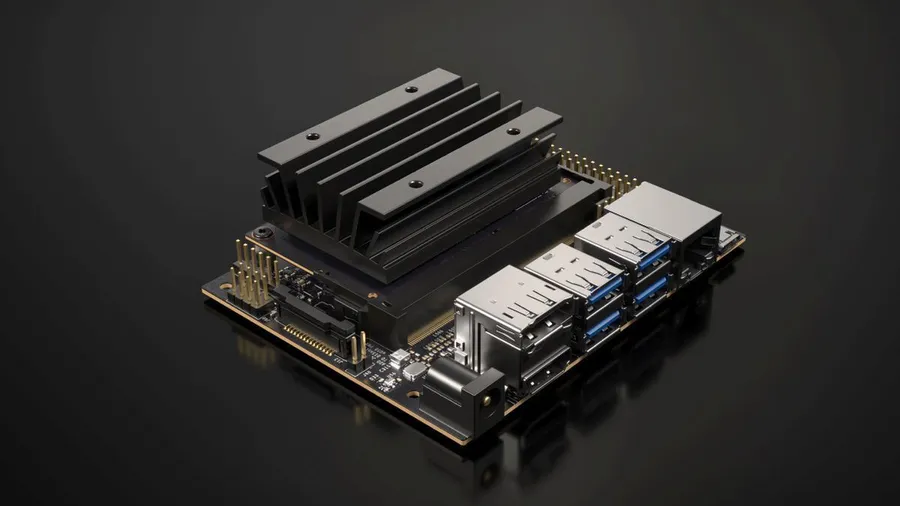
It talked about the NVIDIA Jetson Nano board and how to use it, for example, for AI. That got me thinking about other potential applications. Imagine you have a small business with, let’s say, 20 employees. Everyone needs their own computer. What are the options?
X86 PC
The first option is to buy them standard Windows PCs… a typical low-end office Core i3 costs about €300. (Of course, you can find cheaper ones with a Celeron or Pentium and a mechanical HDD, but only a masochist would work on those voluntarily). Let’s add an IPS monitor for €100 + a keyboard for €30 + a mouse for €10. Furthermore, Windows 10 Pro 64-bit (OEM) – the cheapest I found was €150 – and we are up to €600 per employee.
Maybe some of you are thinking, why not use Linux? However, X86 hardware often has drivers written only for Windows, and Linux support is unofficial or partial. If you buy a piece of hardware that doesn’t run optimally on X86 Linux, the manufacturer will basically tell you to go away because they only support Windows. Some do support Linux, but it’s not the norm, and official Linux drivers are often delayed or you have to rely on reverse-engineered open-source drivers written by hobbyists. Furthermore, this kind of setup works fine at home, but in a commercial environment, you need guarantees and support. And that support has to be paid for, even in the Linux world:
- RHEL support costs around $300 per license.
- Oracle Linux annual support can go up to $1199.
If you think I’m some big Windows fanboy, let me correct you. This is where the Jetson Nano enters the stage (and the office).
The second option is to invest €100 into this ARM board. Let’s round it up to €150 to account for an NVMe (M.2) SSD, a power adapter, some cables/adapters, and a nice case. Adding a monitor, keyboard, and mouse brings the total to €300. Now, here is the most important part: NVIDIA supplies a customized version of Ubuntu for free, tailored specifically for this board (similar to how macOS is tailored for Apple hardware), so hardware compatibility issues should be minimal. The total cost is €300, which is half of the X86 solution. You save €150 per employee, which across 20 employees is a savings of €3000 – a very nice sum. But it doesn’t end there.
Advantages:
- Half the acquisition cost.
- Massive energy savings – it has two power modes, 5W or 10W (if you need extra performance). Compare this to a typical office PC (around 100W) – you will pay 10 to 20 times less for electricity.
- Eco-friendly – for the same reason, it saves resources and the environment. This is a very important point, and I will return to it at the end of the article.
- Extremely space-saving – all-in-one, lightweight, and incredibly portable. If you need to make a presentation in a meeting room, you don’t have to copy files to a flash drive – you can literally just unplug your PC and carry it with you. No one is going to carry a massive midi-tower case, right?
- Virtually silent.
- Stronger graphics subsystem than cheap office PCs with integrated Intel graphics. While this isn’t a game-changer for standard office tasks, it allows you to run graphics-intensive apps like Blender or edit light video, expanding its usability. Don’t expect miracles, though – the GPU architecture is a couple of generations behind today’s desktop GPUs.
- CUDA support – if you use applications that benefit from GPU acceleration or are building custom solutions.
- Minimal malware susceptibility – malware targeting Linux on ARM is extremely rare.
Disadvantages:
- Limited software ecosystem – you can’t run native desktop MS Office. Many Windows advocates argue that Linux lacks MS Office, which is the de facto enterprise standard. Alternative office suites aren’t 100% compatible. If someone sends you a complex docx file, LibreOffice might mess up the formatting. However, today we have Office 365 on the web, which supports all formats perfectly. While the web version is slightly stripped down, it covers 80% of the desktop app’s functionality.
- Doesn’t run Windows (Windows for ARM currently only supports certain Snapdragon chips). This is a drawback if you rely on software that is strictly Windows-exclusive. Microsoft actually has Windows 10 for ARM and can emulate X86 binaries – a minor technical miracle – but it’s only available to major OEMs. Microsoft is letting another train slip away, and when Apple fully transitions to ARM, they will be left playing catch-up. Déjà vu.
- No built-in Wi-Fi – the lack of integrated Wi-Fi is surprising when much cheaper boards have it. On the other hand, in an office environment, a stable Ethernet connection should be the standard anyway. If you absolutely need Wi-Fi, a €10 USB Wi-Fi dongle solves the problem.
Conclusion – The Environment
To conclude, let’s return to the major benefit: resource conservation. We must start treating our planet with respect, or things will deteriorate rapidly. I’m no radical green activist; I know environmentalism is often a business and a way to secure subsidies. But the fact remains that our population is growing, and wasting resources is unsustainable. CO₂ levels in the atmosphere are rising at a rate similar to the Permian-Triassic transition (250 million years ago), which led to the largest mass extinction in Earth’s history, wiping out about 97% of all species. Earth could have easily turned into a desolate place like Venus, which, due to an runaway greenhouse effect, has a surface temperature of 400°C and rains sulfuric acid. Venus is the most similar planet to Earth in terms of size and composition, and scientists once speculated it could host life. This is what a greenhouse effect can do.
Back to the topic: X86 PCs are like heavy off-road SUVs that few people actually need, yet our city streets are full of them.
If you are herding cattle in a rugged mountainous region with no paved roads, an SUV makes complete sense. The same goes for X86 PCs. They have an indispensable place on the desks of gamers, 3D modelers, animators, engineers, and software developers – people who don’t just consume content, but create highly demanding projects. But why on earth does a receptionist, an accountant, a human resources manager, or a sales representative need that much compute power? They only need to edit a spreadsheet, open a text document, or send an email. Isn’t an X86 PC in these cases just a massive overkill? I believe ARM will soon find its way into spaces where X86 used to reign supreme. Apple has already realized this, and we will soon see ARM chips across their entire desktop lineup.