Why It is Worth Buying a Mechanical Keyboard
I am a programmer – a programmer who, until recently, made quite a lot of typos. A programmer who never really thought about something as trivial as a keyboard because I assumed it didn’t make any difference.
But then a colleague advised me to get a mechanical keyboard. He claimed that typing on it was infinitely better than on a standard one, but also noted that they are quite expensive. Prices start at around €80 (with some high-end models reaching €200 to €300). If that sounds like too much, read on. Initially, I was cautious. I didn’t know what to expect (aside from the higher price tag) and didn’t want to invest too much money without knowing if there would be any real benefit. I accepted that buying something for the first time is always a bit of a gamble, so I did some research. I discovered that a mechanical keyboard offers numerous advantages over traditional membrane ones, which I have since fully confirmed:
Advantages:
- Infinitely better typing experience – they are designed specifically for typing, so for anyone who makes a living writing, a mechanical keyboard is a must-have. Whether you are a programmer, writer, copywriter, or administrative assistant, it will make a massive difference. The tactile feedback is on a completely different level.
- Reduced typos – if you find yourself making a lot of typos, a mechanical keyboard can help improve your accuracy.
- Satisfying auditory feedback – typing produces a distinct sound, reminiscent of a classic typewriter (though this depends on the type of switch you choose). For some, this can be a drawback, especially if you work in an open office next to a loud colleague. However, for the person typing, the sound acts like a positive stimulus for the brain. The click triggers a sense of reward, releasing a small hit of dopamine in the central nervous system. When typing on a standard (membrane) keyboard, it feels like using a calculator – and that’s because membrane technology literally originated in calculators. It was introduced to computer keyboards as a cheap alternative to mechanical switches, and unfortunately, it has completely dominated the consumer market.
- Significantly longer lifespan – I know of mechanical keyboards (like the classic IBM Model M) that are 30 years old and still work like new (even if the plastic has yellowed). Mechanical keyboards are also highly resilient. If you spill a drink on one, it can easily survive after a good cleaning, whereas a membrane keyboard is usually ruined instantly by any liquid contact.
Disadvantages:
- Noise level (though this doesn’t apply to linear Red switches, which are very quiet).
- Higher price tag.
What about the price?
As I mentioned earlier, many believe mechanical keyboards start at €80. But with a bit of searching, you will find that budget models exist for around €30, which is comparable to the price of a decent membrane keyboard. Naturally, more expensive models offer superior build quality, premium materials, and custom features like RGB backlighting.
Technical Deep Dive – Mechanical Switches
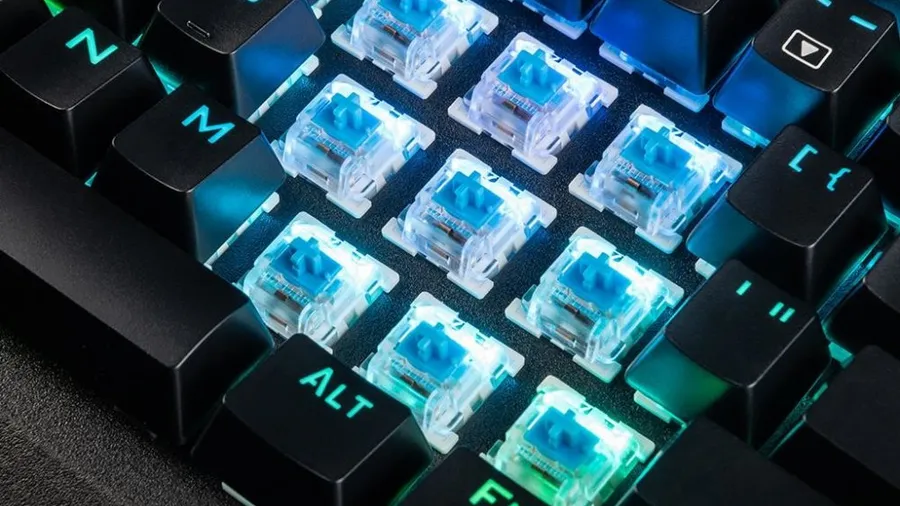
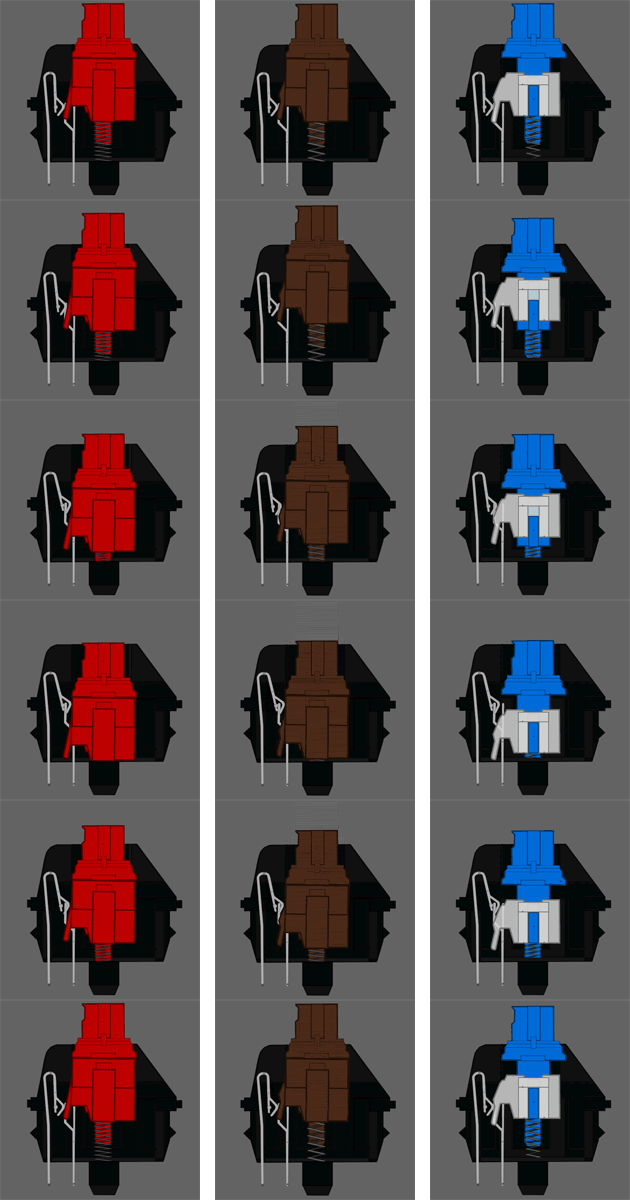
The core of any mechanical keyboard is the switch itself. Switches differ in quality (depending on the manufacturer) and technical characteristics. These characteristics are categorized by colors.
Note: This color refers to the plastic stem of the switch inside the keyboard, not the keycap color or the LED backlighting. The color classification is essential when choosing a keyboard based on how much noise, resistance, or travel distance you prefer. Any switch can support any color of backlighting.
| Color | Characteristics | Tactility | Noise | Actuation Force | Best Suited For |
|---|---|---|---|---|---|
| Red | Linear | None | Quiet | 45g | Gaming |
| Black | Linear | None | Quiet | 60g | Gaming |
| Blue | Tactile / Clicky | High | Loud | 50g | Gaming / Typing |
| Green | Tactile / Clicky | High | Loud | 80g | Gaming / Typing |
| Brown | Tactile / Non-Clicky | Medium | Quiet | 45g | Gaming / Typing |
| Clear | Tactile / Non-Clicky | Medium | Quiet | 65g | Gaming / Typing |
The most common switches on the market are:
- Blue – if you are buying a mechanical keyboard mainly for typing, I highly recommend going with these. They are slightly louder, but they offer the absolute best typing experience.
- Red – quiet and linear, but the keypress feels somewhat similar to a membrane keyboard. It has a slightly mushier feel, and its main advantage over membrane is simply durability.
- Other colors – colors like Brown offer a middle ground between Red and Blue.
Most Common Switch Manufacturers
- Cherry MX – the gold standard and most famous manufacturer. These premium switches are typically found in high-end keyboards costing €100+. I own one with Red switches.
- Kailh – an excellent clone of Cherry MX. Don’t be afraid of them; they are just as durable and high-quality as the original (I have one with Blue switches).
- Outemu – another reputable manufacturer. Personally, I find writing on these slightly more satisfying than on Kailh (I compared Kailh Blue vs. Outemu Blue side-by-side).
- Romer G – proprietary mechanical switches designed by Logitech.
- Razer – proprietary gaming switches by Razer.
- Alienware – proprietary switches by Dell Alienware.
- LK – newer optical-mechanical switches that use light beams to register a keypress, offering faster response times than traditional metal contacts. I haven’t tested these extensively yet, but they are a very promising innovation.

How to Choose a Mechanical Keyboard?
If you have a private office or room and want the absolute best writing experience, choose a keyboard with Blue or Green switches. They feel incredibly satisfying compared to Red ones. I currently use two keyboards with Blue switches (Kailh and Outemu) and prefer them by a mile. Only opt for Red switches if the clicky noise would bother you or your coworkers. Brand doesn’t matter too much, but price does. If you buy a mechanical keyboard under €60, expect some compromises in housing and keycap build quality. The switches might last forever, but other components might wear down in six months. I bought a cheap SPC Gear keyboard that typed beautifully, but the paint started wearing off the keycaps within months, which is why I upgraded to higher-end models. It is definitely worth investing a bit more.
Backlighting is very useful. Plain white is fine, but RGB has become standard. RGB is great not for distracting animations, but because it lets you customize the color and intensity of the keys to match your room’s lighting (warmer tones are better before sleep).
Overview of Budget Mechanical Keyboards
Since this article is aimed at those who don’t want to spend €100+ but still want to upgrade their typing experience, here are some of the most popular budget options featuring full-sized layouts (including numeric keypads). Most feature the US layout, which is easy to get used to, and you can buy transparent stickers for your local layout if needed.
Blue Switches Overview
| Price | Keyboard | Switch Type | Backlighting | Reference |
|---|---|---|---|---|
| €30.00 | Modecom Volcano Gamer Hammer | Outemu Blue | Red | Heureka / Retailers |
| €35.82 | Modecom Volcano Hammer RGB | Outemu Blue | RGB | Heureka / Retailers |
| €40.64 | Modecom Volcano Gamer | Kailh Blue | Red | Heureka / Retailers |
| €43.37 | Gigabyte Force K83 | Cherry MX Blue | None | Heureka / Retailers |
| €43.80 | Natec Genesis Thor 300 | Outemu Blue | Green | Heureka / Retailers |
| €48.55 | Marvo KG925G | Outemu Blue | RGB | Heureka / Retailers |
| €39.90 | ADATA Infarex K20 | Blue Mechanical | RGB | Heureka / Retailers |
Red Switches Overview
| Price | Keyboard | Switch Type | Backlighting | Reference |
|---|---|---|---|---|
| €25.86 | Cherry MX-BOARD 3.0 | Cherry MX Red | None | Heureka / Retailers |
| €40.70 | Gigabyte Force K81 | Cherry MX Red | None | Heureka / Retailers |
| €38.90 | Niceboy ORYX K400 | Outemu Red | RGB | Heureka / Retailers |
| €38.90 | Canyon Interceptor | Outemu Red | RGB | Heureka / Retailers |